Key takeaways
- Pro: Dedicated app with intelligent space-saving tools
- Pro: Clear compatibility labeling removes guesswork
- Con: Nearly $140 is the highest price in this roundup
Running out of storage on your iPhone is one of the most common frustrations among smartphone owners, and the market has responded with a wave of flash drives that plug directly into the Lightning or USB-C port. These drives let you offload photos, videos, and documents without needing Wi-Fi or a computer, making them genuinely useful for travelers, content creators, and anyone whose camera roll keeps growing out of control.
But not every drive labeled “iXpand” or “iPhone flash drive” delivers the same experience. The differences come down to connector type, MFi certification status, companion software quality, and long-term reliability. In this 2026 roundup we compared published specs, listed prices, and aggregated owner feedback across eight drives to identify which ones solve the storage problem and which ones create new ones. The price spread alone is dramatic, from under thirty dollars to nearly one hundred forty, and that range demands careful consideration.
Our top picks





As an Amazon Associate we earn from qualifying purchases at no extra cost to you. Ratings are shown as listed on Amazon.
Quick Picks
| Product | Best for | Price |
|---|---|---|
| SANDISK 256GB iXpand Flash Drive Go | iPhone 14 owners wanting dedicated offload | $139.95 |
| USB Flash Drive for iPhone/iPad MFi 3in1 | Best value MFi-certified option | $29.99 |
| SANDISK 256GB Phone Drive | Multi-device USB-C and Lightning users | $74.99 |
| SanDisk 256GB iXpand Flip | Classic iXpand ecosystem on a budget | $54.99 |
| Lexar D40E 256GB Type-C | USB-C-only phones and laptops | $49.99 |
| SANDISK 64GB iXpand Luxe | Light use and portability | $39.99 |
| MFi Certified Flash Drive 256GB (Blue) | Lowest price for large-capacity iPhone storage | $27.99 |
| MFI Certified 512GB Flash Drive | Maximum capacity at a mid-range price | $53.99 |
How We Picked
We evaluated each drive on four criteria: connector compatibility (whether it works with current and recent iPhones without a dongle), MFi certification (which determines whether iOS will reliably recognize and write to the drive without workarounds), capacity-to-price ratio (because paying a premium only makes sense when the brand or software justifies it), and companion software quality (a good app that handles photo and video export saves time compared to Apple’s native Files app). We weighted reliability signals from owner reviews heavily, since a drive that corrupts a single trip’s worth of photos has failed completely regardless of its listed specs.
The 8 Best Ixpand Flash Drive in 2026
SANDISK 256GB iXpand Flash Drive Go
This drive is built specifically for iPhone 14 and older, targeting users who want a purpose-built offload solution rather than a general-purpose stick. Its standout feature is the dedicated iXpand Go app, which automatically finds and frees up space by identifying duplicates and large files. The 256GB capacity handles thousands of photos or hours of video comfortably.
- Pro: Dedicated app with intelligent space-saving tools
- Pro: Clear compatibility labeling removes guesswork
- Con: Nearly $140 is the highest price in this roundup
Skip this if you already own a newer iPhone with USB-C, or if you are comfortable managing files through Apple’s Files app without extra software.
USB Flash Drive for iPhone/iPad MFi Certified 3in1, 256GB, Silver
At under thirty dollars for 256GB of MFi-certified storage, this 3-in-1 drive offers the best capacity-per-dollar ratio in the group. The three connectors (Lightning, USB-A, and USB-C) mean it works across iPhone, iPad, Mac, and Android without adapters. Owner reviews praise its plug-and-play simplicity and consistent read speeds.
- Pro: 3-in-1 connectors cover virtually every device you own
- Pro: Lowest price among MFi-certified 256GB options
- Con: Generic branding means no companion app or warranty ecosystem comparable to SanDisk
Skip this if you rely on automated backup features or want a drive with manufacturer-supported software updates over time.
SANDISK 256GB Phone Drive for iPhone, USB C and Lightning
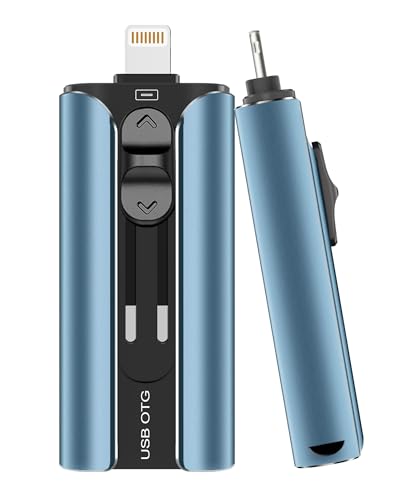
This metallic blue drive bridges the gap between old and new Apple devices with both USB-C and Lightning connectors on a single body. It is compatible with iPads, Macs, and PCs, making it a solid choice for anyone transitioning between device generations. The SanDisk iXpand ecosystem supports direct photo import and video transfer from within the app.
- Pro: Dual connector design future-proofs against port changes
- Pro: Works across Apple and non-Apple platforms without switching drives
- Con: The app experience, while functional, feels less polished than competitors in 2026
Skip this if you only use Lightning devices and want to save money with a simpler single-connector option.
SanDisk 256GB iXpand USB Flash Drive Flip
The Flip is the classic iXpand form factor: a rotating USB-A end for computer access and a Lightning connector for iPhone. It has been in circulation long enough that owner feedback is abundant, and the consensus is that it is dependable and fast for its price tier. The 256GB model sits comfortably in the middle of this list at fifty-five dollars.
- Pro: Proven track record with consistent performance across thousands of reviews
- Pro: Compact flip design protects connectors without a separate cap
- Con: USB-A end is increasingly awkward on modern laptops that are all USB-C
Skip this if your laptop or desktop lacks a USB-A port, as you will need an adapter for the computer end.
Lexar D40E 256GB Dual USB 3.2 Gen 1 Type-C Jump Drive
This is the only drive in the roundup without a Lightning connector, so it is strictly for USB-C devices: newer iPhones, Android phones, iPads, and laptops. Its USB 3.2 Gen 1 interface delivers noticeably faster transfers than older USB-A drives when paired with a compatible host. The champagne silver finish and compact size make it easy to carry.
- Pro: Fast USB 3.2 Gen 1 speeds for large video files
- Pro: Reliable Lexar build quality at a moderate price
- Con: No Lightning connector, so it is incompatible with iPhone 14 and older
Skip this if you still use a Lightning-port iPhone, as it will simply not fit.
SANDISK 64GB iXpand Flash Drive Luxe
The Luxe is the smallest-capacity drive here, but it compensates with a premium build and dual Lightning plus USB-C connectors. Works with iPhone 14 and older. At forty dollars for 64GB the price-per-gigabyte is poor, yet the form factor and connector layout suit users who only need occasional photo offloading and value portability over volume.
- Pro: Dual connectors with a compact, well-built body
- Pro: Part of the established iXpand software ecosystem
- Con: 64GB fills up quickly with 4K video
Skip this if you capture video regularly; the capacity simply will not hold up.
MFi Certified Flash Drive 256GB for iPhone Thumb Drive
At just twenty-eight dollars this drive is the cheapest in the roundup and still carries MFi certification. It supports iPhone, iPad, Android, and PC with a multi-connector design and includes a companion app for photo and video import. The blue color and generic packaging signal a no-frills approach, but the core function works.
- Pro: Lowest absolute price for 256GB of MFi-certified storage
- Pro: Broad device compatibility out of the box
- Con: Sparse owner reviews make long-term reliability harder to assess than established brands
Skip this if brand-name support and warranty service matter to you, or if you want a drive for sensitive archival storage.
MFI Certified 512GB Flash Drive
This is the highest-capacity drive in the list at a nominal 512GB, with roughly 484GB actually available for user files. It targets photographers and videographers who need to offload large shoots in a single pass. Compatible with iOS, Android, and PC, it offers solid value at under fifty-four dollars.
- Pro: Nearly double the usable space of most competitors here
- Pro: Competitive pricing for its capacity tier
- Con: Generic branding and limited third-party software support compared to SanDisk equivalents
Skip this if you prefer a well-known brand with dedicated app development and predictable firmware updates.
Buying Guide
Connector Type Determines Everything
Your iPhone model dictates which drive fits the port physically. iPhone 14 and older use Lightning; iPhone 15 and newer use USB-C. A drive with both connectors gives flexibility during a transition period, but if you are committed to one port type, a single-connector drive often costs less. Never buy a USB-A-only drive expecting direct iPhone compatibility.
MFi Certification Is Non-Negotiable for iPhone Writing
Without MFi certification, iOS may recognize a drive for reading but refuse to write to it, or the transfer may silently corrupt. Every drive in this roundup either carries MFi certification or is designed for USB-C devices where the standard applies differently. If your primary use is moving photos from your iPhone to the drive, confirm the listing explicitly mentions MFi or works natively over USB-C.
Capacity Planning for Video
A minute of 4K HDR video on modern iPhones can consume over 200MB. At 64GB you get roughly five minutes of headroom after the operating system claims space, which is why the iXpand Luxe suits photo-only users. For video, target 256GB minimum, and consider 512GB if you shoot 4K at high frame rates and cannot offload to a computer for days at a time.
Our Verdict
The top pick is the SANDISK 256GB Phone Drive for its dual-connector versatility, established software ecosystem, and fair pricing. The budget pick is the USB Flash Drive for iPhone/iPad MFi Certified 3in1 at under thirty dollars, which delivers the most MFi-certified storage per dollar in the group. However, if you already own a USB-C iPhone exclusively and pair it with a USB-C laptop, the Lexar D40E wins on raw transfer speed and eliminates the clutter of unused connectors.
FAQ
Can I use an iXpand flash drive without the SanDisk app?
Yes, iOS can read and write files from MFi-certified drives through the native Files app. The SanDisk iXpand software adds convenience features like automatic photo detection and space analysis, but it is not a requirement for basic transfers.
Why does a 512GB drive show only about 484GB of usable space?
Manufacturers format drives with a filesystem and reserve space for firmware and error correction. The ~28GB difference between the advertised 512GB and the available 484GB is normal and applies to virtually every flash drive on the market, not just the MFI Certified 512GB model.
Do I need a different drive for my iPad and iPhone?
No. Any MFi-certified Lightning or USB-C drive that works with your iPhone will work with an iPad that has the same port type, since iPads run iPadOS and share the same external storage APIs.
What happens if I unplug the drive during a transfer?
Interrupting a write operation can corrupt the file currently being transferred and, in rare cases, damage the filesystem on the drive. Always eject through the Files app or wait for a completion confirmation before disconnecting.