Key takeaways
- Best Overall for Small Apartments: WalkingPad P1 (fold-in-half storage)
- Best Value: UREVO Strol 2E (2-in-1 with safety handle and remote)
- Best Budget: ANCHEER 2 in 1 Under Desk Treadmill (2.5HP, 300 lbs)
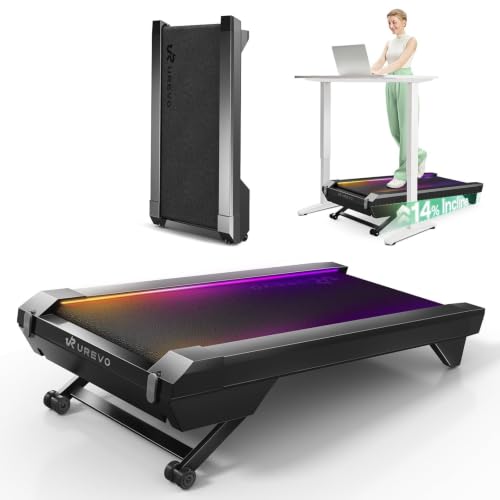
- Best Premium Incline: UREVO CyberPad (14% auto incline, brushless motor)
- Best for Heavier Walkers: TRAILVIBER 12% Auto Incline (450 lb capacity)
- Best Brand-Name Motor: CYBERGOING T10 (Bosch-powered, fixed 7% incline)
- Best for Walk-and-Jog Days: Goplus 2 in 1 Under Desk Treadmill (app, remote, speaker)
The best under desk treadmill for most small apartments is the WalkingPad P1, because it folds in half and slides behind a door or under a bed, with the UREVO Strol 2E as the runner-up for buyers who want a lower price, an included remote and a fold-up handle bar. Apartment life changes the buying rules: a walking pad has to be quiet enough for the people downstairs, light enough to move alone, slim enough to store, and sturdy enough that it does not rattle a thin floor. This guide ranks seven walking pads by those four things first and by speed or incline second, and it explains exactly where each one will frustrate you. It is a different angle from a general under-desk list: here the question is not “which is the most powerful” but “which one still works when you live in 600 square feet.”
Our top picks


As an Amazon Associate we earn from qualifying purchases at no extra cost to you.
Top Picks at a Glance
- Best Overall for Small Apartments: WalkingPad P1 (fold-in-half storage)
- Best Value: UREVO Strol 2E (2-in-1 with safety handle and remote)
- Best Budget: ANCHEER 2 in 1 Under Desk Treadmill (2.5HP, 300 lbs)
- Best Premium Incline: UREVO CyberPad (14% auto incline, brushless motor)
- Best for Heavier Walkers: TRAILVIBER 12% Auto Incline (450 lb capacity)
- Best Brand-Name Motor: CYBERGOING T10 (Bosch-powered, fixed 7% incline)
- Best for Walk-and-Jog Days: Goplus 2 in 1 Under Desk Treadmill (app, remote, speaker)
Comparison Table
| Product | Best for | Key specs (as listed) | Watch for | Price tier |
|---|---|---|---|---|
| WalkingPad P1 | Tight storage | Fold-in-half design; 3 control options; spacious belt | Top speed and weight limit not stated in the listing title | Premium |
| UREVO Strol 2E | All-round value | 2-in-1 folding; safety handle; dual LED display; app; remote included | Motor power and weight limit not listed in the title | Mid-range |
| ANCHEER 2 in 1 | Tight budgets | 2.5HP; 300 lbs capacity; remote; installation-free | Brand support is thinner than the big names | Budget |
| UREVO CyberPad | Incline walking | 14% auto incline; brushless motor; AI-powered app | Larger and heavier than a flat pad | Premium |
| TRAILVIBER 12% Auto Incline | Higher body weight | 450 lb capacity; 9-level auto incline to 12%; app and Bluetooth speaker | Incline mechanism adds bulk | Mid-range to Premium |
| CYBERGOING T10 | Desk walking only | Bosch-powered; fixed 7% manual incline; up to 4 MPH; 300 lb; 15 x 36 in belt | Walking pace only, not for jogging | Mid-range |
| Goplus 2 in 1 | Walk plus light jog | 2.25HP; app and remote; Bluetooth speaker; LED display | Older design generation | Budget to Mid-range |
1. WalkingPad P1: Best for Small-Apartment Storage
- Fold-in-half design, listed as slim and easy to store
- Under-desk compact format with a “spacious” walking belt (exact belt size not listed in the title)
- Three control options (the listing does not name them in the title, so check the maker page for details)
- Top speed, motor wattage and rated user weight: not listed
Best for: renters who need to hide the machine every evening. Skip if: you want a handle bar for balance or plan to run.
The reason the P1 leads this list is the fold. Most under-desk treadmills are flat slabs that you slide upright against a wall, which only works if you have a clear wall. A fold-in-half pad shortens the footprint so it can disappear under a sofa, behind a bedroom door or into the gap beside a wardrobe. In a studio apartment where the living area doubles as the office, that is the difference between a pad you use daily and one that becomes a tripping hazard you start ignoring.
Because the listing focuses on compact design and the three control options, think of the P1 as a walking-first machine. The brand is one of the best known names in this category, which usually matters for app support, spare parts and a clear warranty process. Since the title does not state speed or weight limits, confirm both on the maker page before ordering if you are heavier than average or if you plan on faster paces.
Pros: folds in half; compact footprint; recognised brand; easy to stash. Cons: premium pricing; key numbers not in the listing title; no handle bar in the design as listed.
2. UREVO Strol 2E: Best Value 2-in-1
- Smart 2-in-1 folding treadmill with a safety handle
- Plug and play, no assembly claimed in the listing
- Dual LED display plus a workout app
- Remote control included; “walking or running” use stated
- Weight capacity and motor wattage: not listed in the title
Best for: people who want one machine for desk walking and the occasional brisk jog. Skip if: you need the thinnest possible fold.
The 2-in-1 label means the handle can be raised for exercise sessions and lowered or removed when you are working at a desk. For an apartment this is useful twice over: the handle gives you something to grab when stepping on after a long sitting spell, and the overall unit stores upright in a closet. The plug-and-play wording suggests you can unbox it and use it the same day, which matters if you do not own tools or have no space to spread parts across the floor.
The dual display and app are conveniences rather than reasons to buy, but the remote is a genuine plus. Reaching down to the console while standing at a desk is awkward; a remote lets you change speed without leaning. The listing also names a “Flaxen” colour option, so it is one of the few pads that will not look like a gym machine in a living room.
Pros: safety handle; remote included; app and dual display; plug and play. Cons: speed and weight numbers not in the title; thicker folded than a fold-in-half pad.
3. ANCHEER 2 in 1 Under Desk Treadmill: Best Budget
- 2.5HP motor listed
- 300 lbs weight capacity listed
- Remote control included
- Marketed for home, gym or office; “ultra-quiet” and “installation-free” in the listing
Best for: first-time buyers who are not sure walking at a desk will stick. Skip if: you want a polished app or a well-known name behind the warranty.
A budget walking pad earns its keep by doing the basic job reliably: a belt that moves at a steady slow speed under a typical office-chair user. The ANCHEER lists a 2.5HP motor and a 300 lb capacity, which are respectable figures for the price tier. Keep in mind that “HP” ratings on walking pads are peak numbers and not a continuous-power guarantee, so the useful reading is relative: 2.5HP puts it in the same class as most other value pads.
The “ultra-quiet” wording is a marketing claim, not a measurement, and the listing gives no decibel figure. Treat it as “probably quiet enough for walking”, and do not expect library silence. If your downstairs neighbours are sensitive, a rubber mat under any walking pad helps a lot more than a spec sheet does.
Pros: lowest entry price in this group; remote included; 300 lb rating; no assembly. Cons: less brand support; belt dimensions not stated in the title; simple feature set.
4. UREVO CyberPad: Best Premium Incline Pad
- 14% auto incline
- Brushless motor
- AI-powered app, speed lights and a “spacious surface” per the listing
- Designed for home office fitness
Best for: people who want incline walking in a small footprint. Skip if: you need the smallest fold or the lowest price.
Incline walking raises effort without raising speed, so you can work harder at a pace that is still comfortable for typing or taking calls. A 14% automatic incline is among the steepest on under-desk machines, and being automatic you change it from the remote or app rather than by hand. A brushless motor is generally the quieter, more durable choice compared with brushed motors, and quiet is the whole point of apartment living.
The trade-off is size and money. Auto-incline mechanisms add a lift motor, so the machine is bulkier than a flat pad, and you should measure the closet where it will live. Check ceiling clearance too: at full incline your head is higher relative to your desk, so confirm the desk height still works with the incline you plan to use.
Pros: steep auto incline; brushless motor; app support; attractive design. Cons: costs more; bulkier to store; weight rating not in the listing title.
5. TRAILVIBER 12% Auto Incline: Best for Higher Weight Limits
- 450 lb capacity
- 9-level auto incline up to 12%
- Smart app plus Bluetooth speaker
- RGB display; offered in black and blue
Best for: heavier walkers who still need an apartment-friendly format. Skip if: you want a plain, no-frills machine.
Many compact walking pads stop at 250 to 300 lbs. A 450 lb rating gives larger users a clear margin, and a higher rating generally goes with a stronger frame and motor. That makes the TRAILVIBER the pick for anyone who has bounced off lighter machines. Nine incline levels also let you progress gradually instead of jumping between two or three presets.
Features like a Bluetooth speaker and RGB display are extras. A built-in speaker is convenient for podcasts, but in a shared building you may prefer headphones anyway. Because the format includes auto incline, expect a deeper deck and more weight than a flat fold-in-half model.
Pros: 450 lb capacity; 9 incline levels; app and speaker; two colours. Cons: larger footprint; features you may not need; mid-to-premium cost.
6. CYBERGOING T10: Best for Desk Walking With a Known Motor Brand
- Listed as powered by Bosch
- Fixed 7% manual incline
- Up to 4 MPH
- 300 lb capacity; 15 x 36 inch belt
- App and remote
Best for: pure desk walkers who will never jog. Skip if: you want to walk flat or to change incline without tools.
The T10 is one of the few listings that gives belt dimensions and a maximum speed up front. At 4 MPH it covers the typical working-at-a-desk range of about 1 to 3 MPH comfortably, and a belt that is 36 inches long is adequate for a normal stride at those speeds. The fixed 7% manual incline is a double-edged feature: it burns more energy per minute, but it can feel odd if you want a flat walk while typing. Manual incline means adjusting the feet or frame rather than pressing a button.
Pros: clear specs; app and remote; Bosch-powered per the listing; 300 lb rating. Cons: incline is fixed; max 4 MPH.
7. Goplus 2 in 1 Under Desk Treadmill: Best for Walk-and-Jog Flexibility
- 2.25HP motor
- Installation-free, app control and remote control
- Bluetooth speaker and LED display
- Walking and jogging use stated
Best for: casual users who want a speaker and app for a modest outlay. Skip if: you want the newest build or a long warranty story.
Goplus sells this as a folding 2-in-1, and variants of it have been on sale for several years. That is both a strength and a caution: a long-running design has a track record, but may lack newer refinements such as brushless drive. The listing highlights installation-free setup, which means you can use it right away. The Bluetooth speaker is handy for casual walking, though if you share walls with neighbours, headphones are kinder.
Pros: fold-up form; remote and app; speaker; fair price. Cons: older platform; weight rating not in the title.
Also Consider
- WalkingPad Z1R: a foldable pad with a removable handrail and a listed 5 MPH max speed; pick it if you want the brand with a bit more speed range than a pure walker.
- MEE GOO 2 in 1: listed with 12% incline, 0.6 to 7.5 MPH, 330 lb capacity and remote; a feature-heavy option for those who may jog.
- Acezoe 3 in 1: 10% incline with a removable desk workstation, useful if you also lack a desk and want one combined unit.
- VIVO laptop treadmill desk stand: not a treadmill, but a wooden stand that lets you work while walking if your normal desk is the wrong height.
How We Chose
This list is research-based. We compared listing details and manufacturer-style spec lines for each product, looked at what independent fitness and ergonomics publications say about walking pads in general, and sorted the options by what matters in a small apartment: fold or storage format, noise-related design choices such as motor type, weight rating, and the control scheme. We did not personally test any of these machines, so we do not claim measured decibel levels, belt lifespans or accuracy of speed readouts. Where a number was not stated in the listing, we say “not listed” rather than guess. Price is shown only as a tier because listed prices change often.
We also limited the list to a maximum of two models from one brand, and we favoured products that are currently sold with a visible spec sheet over untraceable no-name items.
Buying Guide
Noise: what really matters in an apartment
Manufacturers rarely publish decibel numbers for walking pads, and the ones that do rarely say how they measured them. The more reliable signals are the motor type and the build. Brushless motors tend to run smoother than brushed ones, a heavier frame transmits less vibration, and a rubber mat underneath reduces what travels into the floor. Footfall is often louder than the motor, so walking with a softer stride and wearing cushioned shoes helps as much as any spec. If you work from home during neighbours’ sleeping hours, try the pad at your lowest speed first and increase gradually, listening for belt slap and a rhythmic thump that can carry through joists.
Storage format: fold, upright or flat
Measure three places before you buy: the spot where it will live, the path you will carry it along and the height of any clearance beneath furniture. Fold-in-half pads like the WalkingPad P1 shorten to roughly half their length. Upright-store pads with a fold-up handle bar, such as 2-in-1 designs, need wall space. Flat pads without a handle bar slide under a bed if it has about 4 to 5 inches of clearance, but you must check the deck height listed on the maker page because it is not always in the title. Also think about who will move it: a unit that is awkward to lift will end up permanently in the middle of the room.
Speed range and incline
Desk work is done at about 1 to 2.5 MPH. If you only ever walk, a 4 MPH max like the CYBERGOING T10 is plenty. If you want brisk walks or light jogging, look for 6 MPH or higher and a longer belt. Incline adds effort without adding speed. A rough guide: 0 to 5% is gentle, 6 to 10% is a clear workout, and 10 to 14% is stiff, so choose the range you realistically will use. If you do pick an incline model, remember that the same incline you enjoy in a gym can feel awkward when your hands are on a keyboard, so most people keep the incline lower at the desk.
Weight capacity and motor rating
Leave at least 20 to 25 percent headroom between your body weight and the listed capacity. A pad rated for 300 lbs is comfortable for someone around 220 lbs; a 450 lb rating suits heavier users. Remember that “peak horsepower” figures on walking pads are marketing numbers, so compare them only inside the same price class. A higher rating generally means a sturdier frame, which is also quieter over time because there is less flex and rattle.
Controls, app and warranty
A remote is far more useful than an app when you are standing at a desk. Apps matter only if you like tracking steps. Warranty and support are where brand names earn their premium: look for a stated warranty length on the maker page and a way to contact the seller. Belts need occasional lubrication on some models, so check whether the maker says it is required and what product they recommend.
Common Mistakes to Avoid
- Buying for the best spec sheet rather than for the storage spot you actually have.
- Putting the pad on a bare hardwood floor without a mat.
- Choosing a steep incline pad when your desk height cannot accommodate it.
- Assuming “quiet” in the listing means “silent” in a thin-floored building.
- Ignoring shoe choice; walking in socks or slippers on the belt is a fall risk.
- Starting at a speed that is too high; most people find the sweet spot for typing is much slower than they expect.
A Simple Apartment Setup Plan
Before the pad arrives, clear a strip of floor about the length of the deck plus a foot behind it, and lay down a mat. Put the desk at elbow height when you stand on the belt, with the screen top at about eye level. Use the first few days for short sessions of 10 to 15 minutes at 1 MPH, then build to an hour or two split across the day. After each session, fold or stand the pad away so it is never in a doorway. If the pad has a safety key or clip, wear it from the first session so the habit sticks.
Frequently Asked Questions
What is the best under desk treadmill for a small apartment?
The WalkingPad P1 is our top pick because its fold-in-half design takes the least space. The UREVO Strol 2E is the better choice if you want a handle bar and remote at a lower price.
Are under desk treadmills quiet enough for apartments?
Most are quiet enough for walking speeds, but quietness depends on speed, your stride and the floor. Use a rubber mat and keep speeds low in the evening.
How much space does a walking pad need?
You need room for the belt plus a little clearance behind it, and storage space equal to the folded or upright size. Measure your storage spot against the maker’s dimensions before ordering.
Can I jog on an under desk treadmill?
Only on models that list a running speed and a suitable belt, such as the 2-in-1 types. Pure walking pads like the CYBERGOING T10 top out at 4 MPH and are meant for walking.
Do I need a standing desk with a walking pad?
A height-adjustable desk is the ideal partner, but a fixed desk works if your keyboard and screen are at a comfortable height while you stand. A treadmill desk stand can fill the gap.
How do I keep the floor and neighbours happy?
Place a dense rubber or foam mat under the pad, level the feet and avoid walking at peak sleeping hours. Also keep the belt and deck clean, since debris can add noise.
Is incline worth paying for?
Incline is worth it if you want a bigger workout in the same time and at the same speed. If you only want movement during the workday, a flat pad is enough.
Which One Should You Buy?
If your biggest problem is where to put it, buy the WalkingPad P1. If you want the best mix of features and cost, choose the UREVO Strol 2E. If money is tight, the ANCHEER is a sensible starting point, and if you want incline in a small apartment, the UREVO CyberPad is the one to look at. Heavier users should lead with the TRAILVIBER, desk-only walkers with the CYBERGOING T10, and anyone who wants an app and speaker on a budget with the Goplus. Whatever you choose, check the maker page for the numbers we mark “not listed” before you order.
Sources
- WalkingPad manufacturer product pages
- UREVO manufacturer product pages
- CYBERGOING and TRAILVIBER product listing details
- Goplus and ANCHEER product listing details
- US Centers for Disease Control and Prevention physical activity guidance
Last updated: October 2026