Key takeaways
- Nylon: Smooth, strong, and often comfortable against glass. It is a good choice for frequent users who want the fabric to withstand repeated palm contact.
- Polyester: Lightweight, quick-drying, and widely available. It can glide well, although rougher knits may feel less slippery on matte screen protectors.
- Elastane blends: Improve fit and reduce wrinkles. The trade-off is that stretched areas can become thin or lose recovery after many washes.
- Cotton-heavy fabric: Soft at first but more absorbent and slower to dry. It may develop drag as it picks up skin oils and dust.
- Thermal or fleece lining: Useful for cold studios, but usually too warm for long sessions and potentially less smooth on a textured surface.
Best Drawing Gloves for Digital Artists
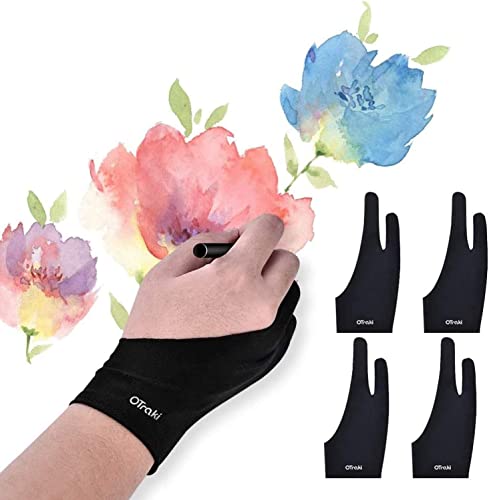
The best drawing glove for digital artists is usually a breathable two-finger glove for maximum palm glide and touchscreen access, while a full-hand glove is the better choice when you need warmth, broad friction reduction, or protection from repeated contact with a tablet surface.
That distinction matters more than brand names. A glove can feel smooth but interfere with shortcuts, trap heat, fit poorly, or place a seam directly under the edge of your hand. The right choice depends on how you draw, whether your tablet accepts touch input, and how often you are willing to wash or replace the glove.
Our top picks


![Artist Drawing Glove 3-Layer Palm Rejection [2 Pack Black] Right Left Hand Digital Art Graphic Tablet iPad Gloves Two Finger Smooth Elasticity Breathable for Stylus Pen Pencil Sketching Painting](https://m.media-amazon.com/images/I/41CrdouqKBL._SL500_.jpg)
As an Amazon Associate we earn from qualifying purchases at no extra cost to you. Ratings are shown as listed on Amazon.
Two-Finger vs. Full-Hand: The Head-to-Head
| Feature | Two-finger glove | Full-hand glove |
|---|---|---|
| Typical coverage | Little finger and ring finger, plus palm side | All fingers, palm, wrist, and sometimes forearm |
| Typical fabric | 80–95% nylon or polyester with 5–20% elastane | Polyester, nylon, elastane, or thin thermal knit |
| Typical weight | 8–20 g | 20–45 g |
| Warmth | Low; most fingers remain uncovered | Low to moderate, depending on knit thickness |
| Palm coverage | Usually covers the outer palm and heel of the hand | Entire palm and fingers are covered |
| Touchscreen access | Usually excellent because fingertips remain bare | Variable; requires conductive fingertips or exposed fingers |
| Best for | Most stylus users, palm rejection, warm studios | Cold rooms, broad contact reduction, artists who dislike exposed skin |
Two-finger gloves are the safer default for digital art. They leave the thumb, index finger, and middle finger free for stylus control and touch gestures. Their smaller fabric area also creates fewer pressure points and less heat. Full-hand designs make more sense when your wrist, knuckles, or fingertips regularly drag across the display, or when you work in a cold room and want continuous coverage.
Material: What Actually Affects Palm Glide?
Most drawing gloves use a smooth synthetic knit rather than cotton. Nylon and polyester resist abrasion and dry quickly; elastane supplies stretch so the glove follows the hand instead of bunching beneath the palm. A useful target is a smooth fabric containing roughly 5–20% elastane. Too little stretch can make the wrist tight, while a very high elastane content may lose its shape sooner.
- Nylon: Smooth, strong, and often comfortable against glass. It is a good choice for frequent users who want the fabric to withstand repeated palm contact.
- Polyester: Lightweight, quick-drying, and widely available. It can glide well, although rougher knits may feel less slippery on matte screen protectors.
- Elastane blends: Improve fit and reduce wrinkles. The trade-off is that stretched areas can become thin or lose recovery after many washes.
- Cotton-heavy fabric: Soft at first but more absorbent and slower to dry. It may develop drag as it picks up skin oils and dust.
- Thermal or fleece lining: Useful for cold studios, but usually too warm for long sessions and potentially less smooth on a textured surface.
Palm glide is not determined by fabric alone. Matte screen protectors create more resistance than glossy glass, and a dirty glove can drag regardless of its fiber content. A smooth outer surface with flat stitching is generally more important than a marketing claim such as “anti-friction.”
Seam Placement Is a Comfort Specification
Inspect where the seams sit, not just what the glove is made from. The most troublesome seam is often the transition between the covered fingers and the palm. If it crosses the heel of your hand, it can leave a pressure line during long sessions. A bulky wrist hem can cause a similar problem when your forearm rests near the tablet edge.
Look for low-profile seams along the side of the hand, a smooth palm panel, and a wrist opening that lies flat. On a full-hand glove, check the finger seams carefully: seams on the underside of the index or middle finger may affect how you grip a stylus. Turn the glove inside out before buying if product photographs allow it; the interior finish reveals more than the exterior.
Touchscreen Compatibility: The Main Full-Hand Compromise
A two-finger glove leaves the fingertips exposed, so it normally preserves touch gestures without special conductive material. This is helpful if you frequently pinch to zoom, rotate the canvas, open menus, or use touch shortcuts.
Full-hand gloves vary considerably. Some have conductive thread in the thumb and index finger, but conductivity can decline when the fingertips are loose, dirty, or stretched. Others are designed only for palm contact and may prevent the display from recognizing taps. If you use touch as part of your workflow, verify that the glove supports capacitive screens rather than assuming every “touchscreen glove” will work equally well.
There is another possible conflict: some pen displays interpret palm contact and finger contact differently. If your software or tablet has unreliable palm rejection, a glove can reduce accidental marks, but it cannot correct an incorrect driver setting. Test touch behavior with the glove on before committing to a long drawing session.
Sizing: Use Hand Width, Not Just Small, Medium, or Large
Measure across the widest part of your palm, excluding the thumb. A practical sizing guide for stretch drawing gloves is:
| Hand width | Common glove size | Fit expectation |
|---|---|---|
| Under 7.5 cm | Small | Snug on smaller hands |
| 7.5–8.5 cm | Medium | Suitable for many average adult hands |
| 8.5–9.5 cm | Large | More room through the palm and wrist |
| Over 9.5 cm | Extra large or extended cut | Less risk of finger and wrist compression |
These are starting points rather than universal standards. Measure the manufacturer’s chart whenever possible. The glove should lie flat without wrinkles, but it should not pull the webbing between your fingers or leave white stress marks around the wrist. If you are between sizes, choose the larger size for palm glide and long sessions; choose the smaller size only if the larger option visibly bunches beneath your hand.
Best Choice by Situation
| Your situation | Best design | Why |
|---|---|---|
| First glove or limited budget | Basic two-finger synthetic knit | Lowest complexity and good touch access |
| Daily professional or student use | Two-finger glove with flat seams and reinforced palm | Balances glide, comfort, and durability |
| Cold workspace | Thin full-hand thermal glove | Keeps more of the hand covered without adding a thick palm |
| Frequent touch gestures | Two-finger glove | Exposed fingertips avoid conductive-touch uncertainty |
| Very large display or broad palm contact | Full-hand or extended-palm design | Provides more coverage where the hand rests |
| Heavy perspiration or long sessions | Lightweight, quick-drying synthetic fabric | Less moisture retention and faster recovery between washes |
Durability and the Real Cost of Ownership
The palm and the seam between the covered fingers usually wear first. Watch for thinning fabric, shiny patches, stretched cuffs, loose threads, and a growing tendency to stick to the screen. A glove does not need to be visibly torn to become less useful: once the palm surface becomes oily or rough, glide can deteriorate.
For a simple cost-per-use estimate, suppose a glove costs $8–$18 and remains comfortable for 120–250 drawing sessions. That works out to approximately 3–15 cents per session. A more expensive glove is worthwhile if its seams last twice as long or its fit prevents you from replacing it after a few weeks, not merely because it has a higher price.
Cleaning and maintenance
- Wash according to the care label, preferably after several long sessions or whenever the palm feels sticky.
- Use cool or lukewarm water and mild detergent; avoid fabric softener, which can leave a film on the fibers.
- Close hook-and-loop fasteners before washing so they do not damage the knit.
- Air-dry flat or hang by the cuff. Avoid high heat, which can reduce elastane recovery.
- Clean the tablet surface separately with the manufacturer-approved method before judging the glove’s glide.
Do not wear a damp glove on a powered device, and do not use a glove as a substitute for cleaning an oily screen. Keeping two inexpensive gloves in rotation can extend ownership: one can dry while the other is in use, reducing the temptation to machine-dry or continue wearing a dirty glove.
Bottom Line
Choose a two-finger synthetic glove with a smooth palm, flat side seams, exposed fingertips, and a size that lies flat without squeezing. It is the best all-around design for most digital artists. Choose a full-hand model only when you specifically need extra coverage, warmth, or contact reduction across the fingers, and prioritize conductive fingertips if touch gestures are part of your workflow. Material quality, seam placement, and correct sizing will affect your drawing experience more than the number of fingers covered.